|
Stopwatch Software Download Page |
 |
Download
the Stopwatch Conversion Software.
Our Stopwatch
Conversion Program can load data from over 15 different makes of
stopwatch (both real stopwatches and smartphone apps) and save the
times into a CSV File (which can be loaded into Microsoft Excel and
Race Management software) or a Parkrun_Timer file that can be loaded
into parkrun's WebFMS system.
You are free
to download and install the software for testing purposes. After
installing the software, only the first 5 times will be valid until
the software is licenced.
parkrun users
can contact parkrun HQ for a free licence and the software must only be
used for parkrun events.
Other users, sports clubs and event organisers can obtain a licence key for £25
which will unlock the software.
Cross
Platform Support
The software
runs on Windows and will also run on Apple Mac OS X and Linux using
the free Mono Project .NET framework
parkrun users
should note that parkrun Support can only deal with Windows users.
Step 1 -
Download and Install USB Drivers if you are using Junsd, Digisport or
Ultrak
| Junsd |
For Windows 7, you should be able to plug in the
stopwatch and let Windows load the drivers.
For XP and Vista, install the
Prolific PL2303 drivers. The latest are on the support pages at
www.prolific.com.tw but
if you have problems here is link a copy of
Version1.70
of the drivers
For Mac OS X, get the Prolific 2303 drivers from the support pages
of www.prolific.com.tw
For Linux, simply plug it in |
| Ultrak and Digisport |
For Windows, install the
AU9720 drivers from DigiSportInstruments.com
For Mac OS X (10.5 and above) simply plug it in
For Linux, simply plug it in |
Step 2 - Install Microsoft .Net 4 or Mono
Windows Users
need to download and
install Microsoft .Net 4
Client Profile
Mac OS X and
Linux Users need to install Mono from
http://www.mono-project.com
Step 3 - Download and
Install the Stopwatch Conversion Software
| Windows Users |
The latest version is
Version 2.5.0
but Microsoft and Norton are unhappy with the file.
So you may need to download
Version 2.0.1
for now |
| Mac OS X |
Download
StopwatchDownload.exe. You will then need to type "mono
StopwatchDownload.exe" from the Command Line |
| Linux |
Download
StopwatchDownload.exe. You will then need to type "mono
StopwatchDownload.exe" from the Command Line |
Instructions
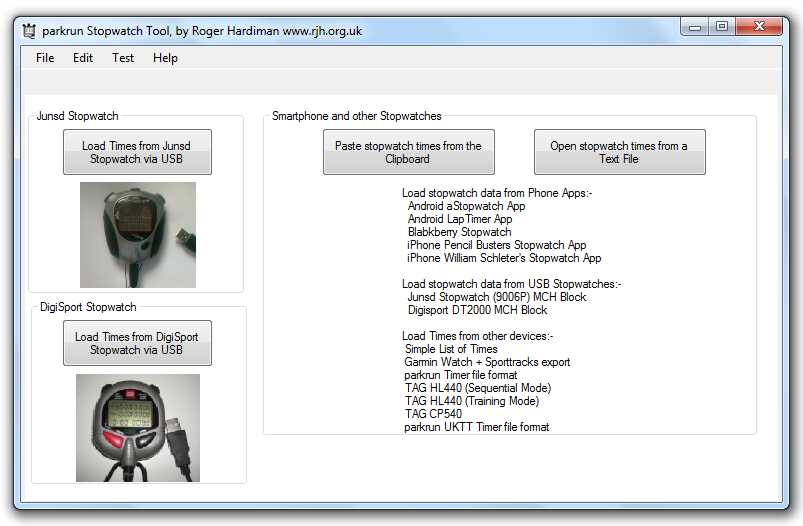
The software works in three ways
1) Junsd, DigiSport and Ultrak Stopwatch Users - connect the stopwatch to the PC,
select the stopwatch in the software and then use Upload All on the
stopwatch Menu to upload the times to the PC. You can then review the
times and save them in either parkrun_timer format (for loading into WebFMS)
or CSV format (for loading into Excel or other Race Management software).
2) Copy and Paste Mode - If you have the time data on the
computer screen
(eg in an email or an opened file), you can COPY and PASTE the data into
the software. A wide range of different formats are supported and
they are auto-detected. You can edit the data within the software too.
3) Load File Mode - If you have the time data saved in a file
which the PC can open (for example .txt file or a .csv file) then you can
Load the data file directly into the program. The software automatically
detects the format of the data.
4)
Save the Times - Once the times are loaded into the software you can
save the times. parkrun format data is saved into
C:\DataSources on Windows and into
your Documents folder on Mac OS X and Linux.
CSV (Excel) format data is saved into your Documents Folder
Change History
|
2.5.0 |
Fixed bug with an Ultrak 499 stopwatch outputting a
non zero value for one of the unused data fields.
Re-write of internals to make the application handle Mac OS X and
Linux Serial Port Names and Directory Structures.
Changes to screen tab layout to fix Mono Windows Forms bugs on the Mac
Update to Debug Screen to separate out hex data. |
|
2.0.1 |
Fixed lap export in CSV mode when using some makes of
stopwatch |
|
2.0.0 |
Added new licence model. Unlicensed users can load
from any stopwatch and can save in CSV format, but are limited to
exporting the first 5 times to the CSV file. Once licenced, the full
features are unlocked. |
|
1.5.1 |
Added support for DigiSport International DT500 and
DigiSport DT2000
stopwatches. (Thanks to Black Park parkun)
Also works with the Ultrak 499 stopwatch.
The DT2000 (Ultrak 499) gives us a stopwatch capable of storing just under 2000 runners
per event. |
|
1.5.0 |
Fixed a bug where COM Ports higher than 9 would not
work. Needed to append "\\.\" to the COM Port name. I introduced this
bug 1.3.3. Thanks for the loan of Dave's laptop to find this. |
|
1.4.1 |
Add support for Michael Hongs Blackberry Stopwatch.
Tiny up some messages in the Debug Screen.
Asks the user if they want to exit if there are unsaved results |
|
1.4.0 |
Files are now exported in parkrun_timer format instead
of UKTT format.
Also added support for opening files (or pasting data) in TAG HL440
Training Mode |
|
1.3.8 |
Correctly process fractions of a second. Added
Rounding up/down of time when saving times, requested by Simon at Hull
parkrun |
|
1.3.7 |
Skypaw changed their data format in version 1.1.0.
Update support.
Also disable WMI to see if that helps some Vista and Win7 machines |
|
1.3.6 |
Added support for iPhone Stopwatch by SkyPaw |
|
1.3.5 |
Added Garmin GPS watch (via SportTracks). Add support
for a basic list of times.
Fixed bug that caused software to fail on computers where WMI takes a
long time. Fixed a bug in logging that hogged the CPU and caused the
Junsd stopwatch data to be missed or processed very slowly. |
|
1.3.4 |
Changed to be a .Net Client Profile Project. Works in
Vista with no need to download .NET 4 files.
Added
support for 2 different Android Phone stopwatches aStopwatch and
LapTimer |
|
1.3.3 |
New serial port code which handles USB cable removals
on Vista. Support for UKTT, Opticon2002 with ERS firmware, TAG HL440
PTB Sequential Mode and
TAG CP520 time data |
| 1.3.2 |
Add ability to open text files and csv files saved on
disk Add support for Pencil Busters iPhone Stopwatch App. Add ability
to change between modes without having to exit |
| 1.3.1 |
Add support for Will Schleter's iPhone App and Blackberry
the Stopwatch |
|
1.2 |
First public Release for Junsd USB Stopwatch.
You MUST plug in the stopwatch before running this program. And you must
quit this program before removing the stopwatch (due to Microsoft's Serial
Port class behaving badly on Vista/Win7)
This version uses the Microsoft Serial Port Class. It also exports in the old parkrun UKTT format. |
Acknowledgements
Thank you to
Junsd for Technical
Information and Documentation on their Stopwatches
Ultrak for Technical
Information and Documentation on their Stopwatches
DigiSport
for Technical Information and Documentation on their Stopwatches
OpenNetCF for their
free Serial Port code which sorted out problems on Windows Vista
Visualpharm.com for
their icons, royalty free as they are mentioned here and in the software
Dave L for buying the first Junsd and for getting Ultrak
equipment
Jonathan for the Danish Manuals and testing the Parkrun
software
Paul , James, Milton Keynes and Roger for providing iPhone and Blackberry
sample data
Simon at Hull parkrun for identifying the lack of rounding up
of times
All the developers of the iPhone and Android apps for their help and sample
data
Dave P for loaning the DigiSport equipment
All the other users who have tested the software and reported
issues
Finally, thanks to all the parkrun Team
(c) Roger Hardiman. Created May 2010. Updated November 2012
|

